Client Work
Client WorkPrivate Service Business Platform — Website, Bookings, Client Portal & Commerce
One branded system—from public website through online bookings, client accounts, admin tools, and Shopify-backed product commerce.
Client Work — anonymised delivery evidence from a real AUREX build. This is not a capability demonstration or a performance case study.
This is anonymised client work from a private service business. AUREX built and delivered a connected platform—public website, branded booking, authenticated client portal, admin tools, and Shopify-backed commerce for physical products—with custom storefront presentation, cart, and hosted checkout integrated into the wider site experience. The screenshots show real delivered interfaces, not mock-ups or performance claims.
Built by AUREX for a private service business.
- Evidence at a glance
- Project classification
- Client Work
- Challenge
- The business offered more than a simple enquiry path. Customers needed to book services, maintain an ongoing account relationship, and purchase physical products—all within one branded digital experience rather than disconnected tools.
- What AUREX built
- AUREX designed and delivered a connected service-business platform—website, booking, client accounts, admin tools, and Shopify-backed commerce—grouped into customer-facing, commerce, operational and production layers.
- Key capabilities delivered
- Public website, Booking system, Client portal, Admin / operator tools, Commerce
- How the system fits together
- After delivery, the business could run the core customer journey and internal operations inside one branded system—from first visit and booking through to client account management, product commerce, and admin control.
- Evidence shown
- Anonymised screenshots of delivered customer and admin interfaces. No performance metrics.
Evidence at a glance
- Website
- Booking System
- Client Portal
- Admin Portal
- Commerce Integration
- Cloud Deployment
The problem
The business offered more than a simple enquiry path. Customers needed to book services, maintain an ongoing account relationship, and purchase physical products—all within one branded digital experience rather than disconnected tools.
A marketing website could explain the offer, but it could not carry bookings, authenticated client history, internal service configuration, product commerce, or day-to-day operational control. Those functions needed to connect inside one branded system rather than spread across separate tools.
- The public website could not support the full client journey on its own
- Bookings needed to happen inside the branded experience—not through a disconnected third-party tool
- Clients needed secure accounts with visibility of their relationship with the business
- Operators needed one place to manage services, availability, bookings and client records
- Service booking and physical-product sales needed to coexist within one branded experience
- Separate systems would have increased administration and weakened trust in the customer experience
The starting point
Before this build, the operational need was broader than a brochure site or enquiry form. The business had to support service bookings, ongoing client accounts, internal administration, and product sales under one brand.
That meant customer-facing and back-office work could not stay disconnected. If booking, account access, product browsing, service configuration and operational oversight lived in separate places, the team would repeat work and the client journey would fragment.
- A website-only setup could not carry bookings, accounts and commerce together
- Customers would have been sent off-brand to book, shop, or follow up manually
- Client records and booking history would have remained difficult to manage centrally
- Service availability and operational visibility would have stayed fragmented
- The business needed one connected platform—not another patchwork of tools
What AUREX built
AUREX designed and delivered a connected service-business platform—website, booking, client accounts, admin tools, and Shopify-backed commerce—grouped into customer-facing, commerce, operational and production layers.
Public website
Custom service and product experience guiding visitors toward booking, enquiry, or product browsing.
Booking system
Availability, session booking, confirmation, and cancellation inside the branded site.
Client portal
Authenticated client accounts and booking history within the same platform.
Admin / operator tools
Bookings, clients, scheduling, service configuration, and operational controls.
Commerce
Shopify-backed product catalogue, custom cart, and hosted checkout flow integrated into the custom site experience.
Customer-facing layer
The public website, booking flow and client portal give customers one branded path from discovery through to account management.
- Public website with service information, product browsing, FAQs, legal pages and enquiry path
- Branded booking flow with service selection and live availability
- Client account registration and secure login
- Client portal with profiles, booking history and booking detail views
- Booking cancellation controls with capacity restoration
Commerce integration
Shopify powers product catalogue, inventory, cart and checkout behind a custom storefront experience integrated into the wider website.
- Shopify backend setup with product catalogue and variants
- Storefront API integration pulling product and inventory data into the custom site
- Custom cart experience within the branded website
- Shopify hosted checkout handoff for payment processing
- Collections and category mapping aligned to the business product ranges
- Shipping zones, tax and payment configuration within Shopify
Operations layer
The admin and operations portal gives the business one internal environment for running services, clients, bookings and enquiries.
- Central admin console for sessions, clients, bookings and calendar
- Service and category configuration used across the booking experience
- Recurring availability, generated slots and manual slot management
- Booking management with month and week calendar views
- Client management with search, account status and access controls
- Enquiry records, activity history and audit visibility
Production layer
The platform was built, tested and deployed as a production system the operator could run after handover—not a prototype or disconnected set of pages.
- Frontend and backend implementation with database structure and relationships
- Roles and access controls across customer and admin surfaces
- Testing and quality assurance against the agreed scope
- Cloud deployment to a production environment
- Documentation and handover for day-to-day operation
Commerce integration
AUREX integrated Shopify as the commerce engine behind the custom website. Booking and client-account functionality remain part of the AUREX-built platform—Shopify handles product catalogue, inventory, cart handoff, checkout, and commerce operations.
- Shopify backend setup with product catalogue and variants
- Inventory and product data managed in Shopify
- Storefront API integration pulling products into the custom site
- Custom storefront presentation aligned to the wider website
- Custom cart experience before checkout handoff
- Shopify hosted checkout for payment processing
- Collections and category mapping for product ranges
- Shipping zones, tax and payment configuration within Shopify
Custom experience on the front. Shopify commerce behind it.
Custom AUREX experience
- Website design and service content
- Product browsing and collection pages
- Custom cart UI
- Branded booking flow
- Client portal and account experience
Shopify commerce infrastructure
- Products and variants
- Inventory
- Checkout
- Payments
- Shipping, tax and order handling
Evidence
Screenshots you can inspect
These anonymised screenshots come from the delivered platform. Each image shows a specific part of the system—not a mock-up or generic template.
Together they show the customer path from account creation and booking through to product commerce and the admin controls used to configure services, manage clients and review scheduled work.
Customer experience
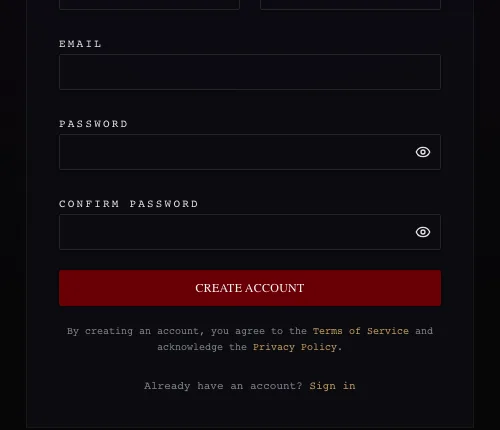
Proof: secure client account creation
Registration form for creating a secure client account inside the branded site.
Customers register inside the branded experience—creating the account relationship required before booking history and portal self-service can work.
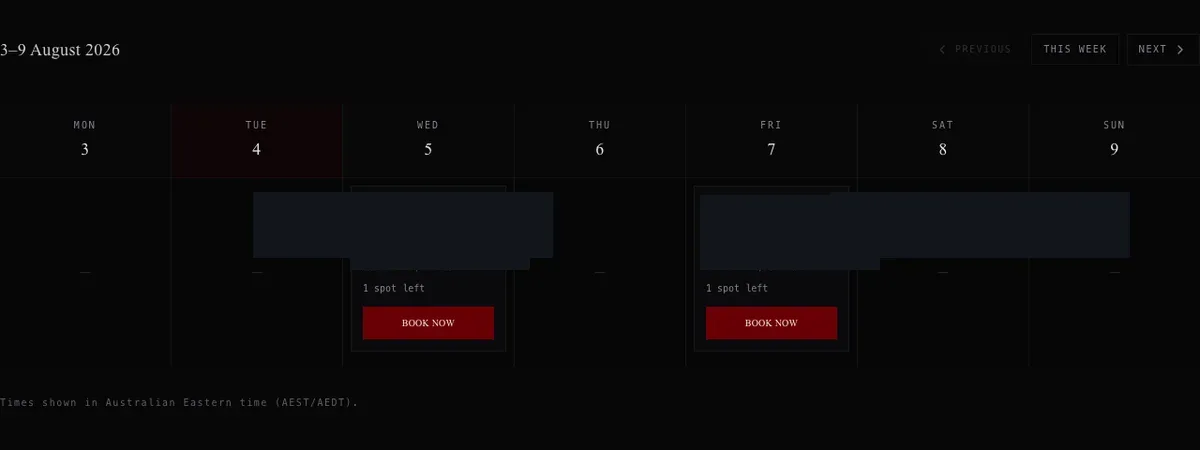
Proof: live availability booking under the brand
Weekly availability view where customers select a session time and begin a booking.
Customers review weekly availability and begin a booking without leaving the business’s own website experience.
Business administration
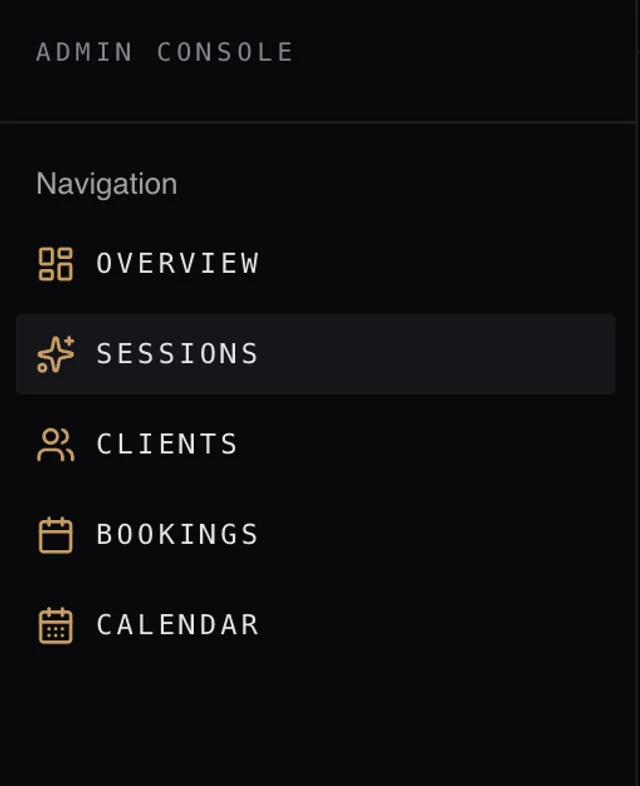
Proof: one internal operating environment
Operator navigation for sessions, clients, bookings, and calendar in one console.
Sessions, clients, bookings and calendar management sit in one admin console—the operational hub behind the customer-facing platform.
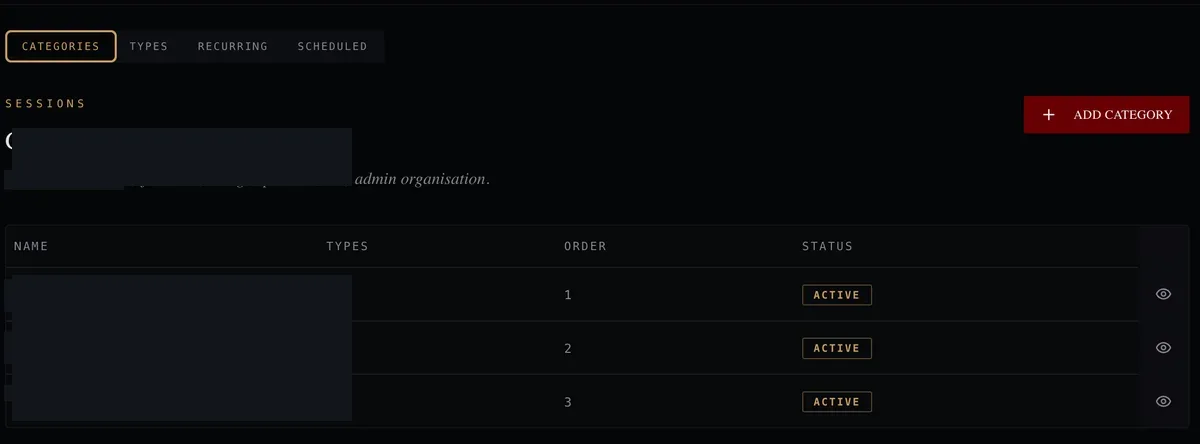
Proof: admin-controlled service structure
Admin view for configuring service categories that drive the public booking catalogue.
Administrators configure service categories that drive what customers see and can book through the public booking flow.
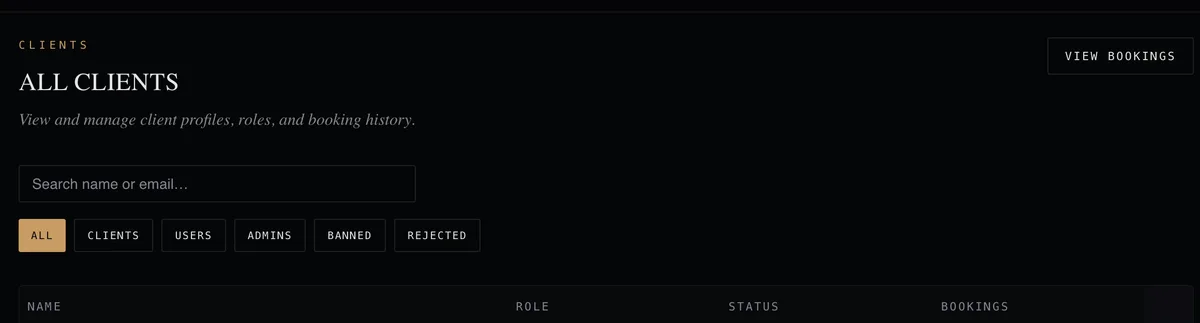
Proof: central client records and access control
Operator view for searching client accounts, roles, and account status.
Registered client accounts, roles and account status are searchable and manageable from one internal view.
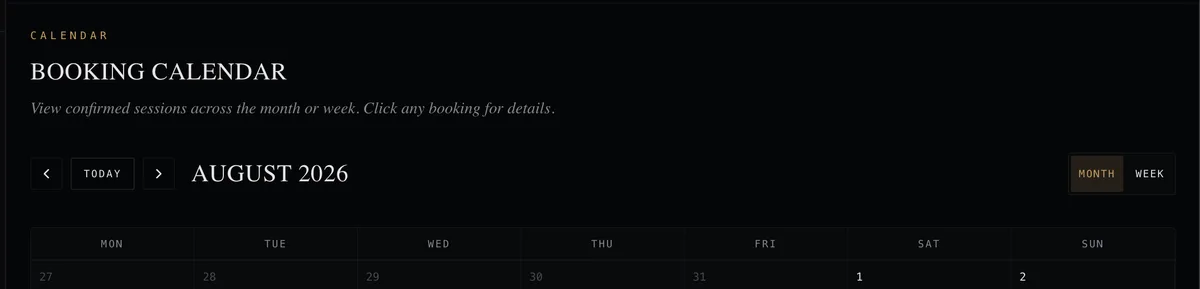
Proof: operational booking visibility
Month view of scheduled sessions for operational review and planning.
Confirmed sessions appear in a month or week calendar view so administrators can review scheduled work and plan ahead.
Example interfaces from a private build. Client identity and sensitive details have been removed. Images show booking, account and admin capability—not commerce screens or business performance. Commerce integration is described in the case study copy.
How the operating workflow changed
Operational capability only—this describes what the delivered system supports, not measured revenue, conversion, time saved or other performance results.
Before
Before the platform, the business needed more than a marketing website. Bookings, client accounts, product sales, service configuration, and operational oversight would have had to be handled across disconnected touchpoints.
After delivery
After delivery, the business could run the core customer journey and internal operations inside one branded system—from first visit and booking through to client account management, product commerce, and admin control.
What operators can manage
- Configure services and categories used in the booking experience
- Manage availability, generated slots and manual scheduling adjustments
- Review and manage bookings from a central calendar
- Search, review and manage client accounts and account status
- Handle enquiries and review activity history from one admin environment
- Manage product catalogue, inventory and commerce operations through Shopify
What clients can do
- Discover services and book inside the branded website experience
- Browse products and add items to a custom cart within the site
- Complete purchases through Shopify hosted checkout
- Create a secure account and manage profile details
- View upcoming, past and cancelled bookings in one portal
- Access booking detail and cancellation controls within their account
Connected workflows
- A booking created in the customer flow is visible inside the client account
- The same booking and client records are available in the admin portal and calendar
- Service configuration in admin drives what customers see when booking
- Product data from Shopify powers the custom storefront browsing and cart experience
- Checkout handoff connects the custom cart to Shopify hosted payment processing
What this proves
This anonymised project is evidence of what AUREX can design, build and deploy for a service business—not a measured performance claim about the client.
- AUREX can connect public booking, authenticated client tools, operator workflows, and product commerce in one branded system
- AUREX can combine service-booking workflows with Shopify-backed product commerce inside one broader platform
- Shopify can sit behind a custom-built storefront rather than forcing an off-the-shelf theme experience
- Booking architecture with live availability inside the business’s own experience
- Secure client portals with account registration, profiles and booking history
- Admin and operations portals for services, clients, bookings and calendar control
- Custom cart and hosted checkout handoff integrated into the custom website
- Role-based access and operational workflows shaped around the business
- Production deployment, testing, documentation and handover
What not to infer
This page shows delivered system capability and anonymised interfaces. No public client identity is disclosed. It does not report client revenue, conversion rates, traffic growth, testimonials, or other performance metrics. Screenshots demonstrate implementation—not business outcomes. Shopify integration capability does not imply AUREX is an official Shopify Partner unless separately verified.
Related AUREX services
This delivery maps most closely to the service tiers below. Follow a link to see how AUREX scopes that type of build.
Website Build
Public website, service information, and enquiry paths delivered as part of the platform.
Booking Website
Branded booking with live availability, confirmations, and customer self-service booking.
Website + Client Portal
Secure client accounts with profiles, booking history, and booking detail views.
Business Operating System
Full connected platform—customer-facing layers, admin operations, and fulfilment workflows.
Explore Shopify & E-commerce Integration
See how AUREX scopes custom storefront experiences with Shopify commerce infrastructure behind them.
Explore Shopify & E-commerce Integration →How AUREX delivered it
- Discovery and system planning
- Brand-aligned interface design
- Frontend and backend implementation
- Shopify backend setup and Storefront API integration
- Database structure and relationships
- Roles and access controls
- Testing and quality assurance
- Cloud deployment
- Documentation and handover
Scope note
Commerce payments run through Shopify hosted checkout as part of the delivered integration. Automated email, SMS, video-meeting automation, external CRM integrations, and other optional third-party integrations outside the agreed scope were not part of this build.